Retirement: Corning pension calculations and communication post-retirement
Two things:
-
I remember talking to a retiree who said Corning had called them about a pension over-payment, and he "wished them luck" collecting. I don't remember who that was. If you're on this list, ping me.
-
If you've retired and had your pension recalculated, reply with a few details. When? Up or down? How did they collect an overpayment?
A 2024 Corning retiree shared a story with me recently. I've edited it a bit for format. Note that this person retired around March 2024.
"I had an interesting learning this week that I'm going to share with you to see if you think it's worth sharing with others. At the end of the day, my recommendation would be that people check into the my total rewards website regularly. If I had done so, the outcome wouldn't have been different, but I would've been on top of it earlier.
I am not on the defined-benefit pension plan so my pension payment is not a huge part of my income planning.. Therefore I did not recognize that my September 1 payment had been reduced by about $55. I don't even remember what got it on my radar this past week But I noticed that it was lower than the payment that was quoted in the paperwork I signed in March. What I didn't notice is that it originally had been the same and had been reduced on September 1. That realization came out of investigation I did after calling the network. When I noticed it, I called the Corning Benefits network. At first the young woman tried to explain that the difference I was seeing was due to taxes withheld, but I had to talk her through the fact that the change had been in the gross distribution not the net and also that The tax amounts she came up with came closer to $100 and not the $55 reduction. So she dug a little deeper and came up with the fact that my payment had been reduced due to an overpayment. I went ahead and asked her to open up an inquiry into the overpayment comment.
It occurred to me that somebody should've notified me of this change. So I looked at my email and there was nothing. I then went onto the my total rewards website and saw there had been a couple of inbox messages in July. They don't explain or go through the overpayment comment, but they did say it was due to an overpayment. I first asked the gal if I was having to pay back the original four months or five months of overpayment, and she thought it was not true, but what I found out when I saw the notices in my inbox is that I was given two options to pay back the overpayment. One was to catch it all up immediately and the other was to let it go over 10 years by a reduction of my payment of less than two dollars a month. I think you can guess which option I chose. But honestly, the choice was by default since I never saw these inbox emails.
The take away - people should log into that website maybe once a month to see if they have any inbox messages is to let people know that apparently corning does miscalculations sometimes and that what's reflected in the paperwork they signed off on the month before they retired may not be accurate. I'm curious as to how many times it actually gets calculated as being a mistake in our favor. Like I said, my pension payment is pretty tiny and not a big part of my income planning, but I thought it was very odd that the paperwork I signed in March could have a number that was incorrect and ended up being corrected. The other thing I learned is that the attachments in your inbox on the total rewards website do not open or download on my iPad. I had to go to my laptop."
This is somewhat timely for me because I received my 2nd pension recalculation notice this week. This caused a slight pension increase, so I'm not complaining, but 2 within 3 months seems odd to me. In the story above, their pension was recalculated 3 months after retirement.
How to do post-retirement communications with Corning was not clear to me, so I thought I'd explain what's happened in my case.
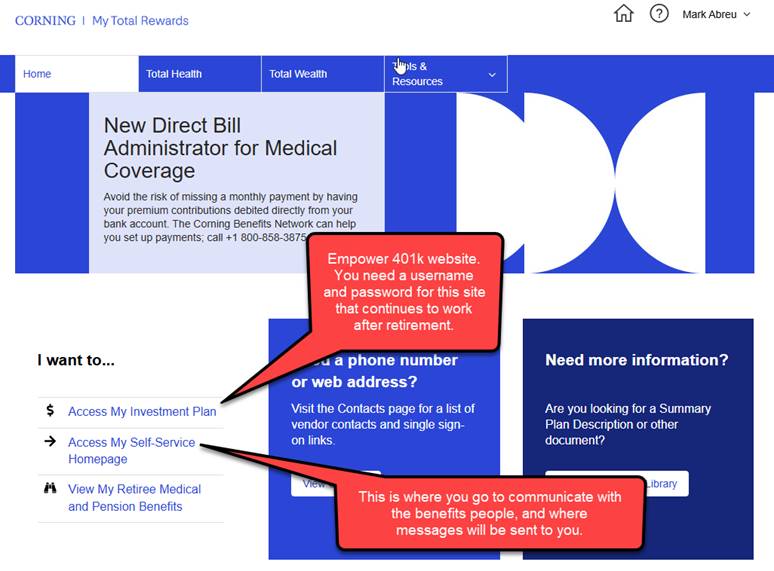
While you're employed, and go to True Blue -> My Total Rewards, you end up logging into https://corning.ehr.com. This is done via something called "single sign-on" so you don't have to enter any username or password. Once at this site, you can do two things:
- Go on to the Empower 401k site. You will need a username and password for that.
- Look around at your Corning benefits "stuff".
The Self-Service Homepage follows:
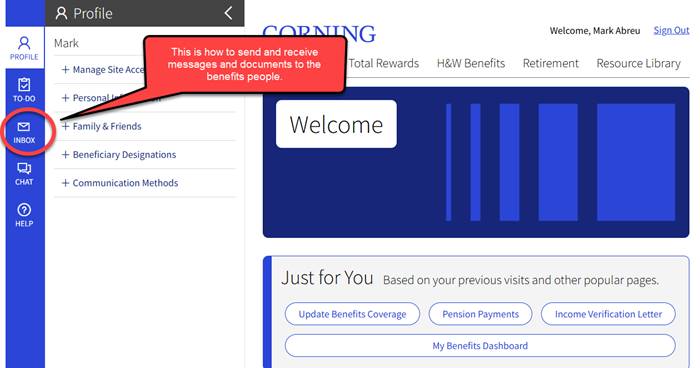
About a week before I retired, I used this very system (Inbox) to send them a note. I asked that they reset my account so I could sign up with a new email address and password I could use once retired. They sent some very specific instructions that you need to follow.
In the "Profile" you can specify contact information, and it's worth taking a look in there.
At this point, I want to put my IT nerd hat on and commence with making your retired lives more complicated, but that's not what retirement should be all about. I want to share some things that I do, but I'm not sure those are things you should do. The rest of this note isn't really retirement information.
When you signed up for home internet, your service provider (ISP) provided you with an email address. The problem with using that email address comes later when you decide to change your service provider. For example, I use Spectrum at the moment, but I have AT&T fiber in my neighborhood. If you use the Spectrum-provided email address, then change your service provider, your email address will change. This can be a very complicated transition. This also comes up when you move.
Your other choice is to use a "free" or "for pay" email provider. This way you disconnect your email address from your ISP. Gmail, Microsoft (Hotmail, Live, Outlook), Yahoo and Proton are examples.
When you sign up for one of these email services, they will likely ask for a recovery email address. This is a second address they can use in case you get locked out of your primary email account. You may be tempted to use your ISP-provided email address here, but I would suggest you sign up with a 2nd email service instead, and leave your ISP-provided address to die.
Once you have two email providers, things are a bit more complicated.
The easiest way to access your email is via their web-page. No this is not as slick as Outlook, but Outlook is a complicated app to run on a home PC.
On my phone I have both a Gmail app and an Outlook app (for my other email address). I did not integrate both accounts into one phone app. I think separate is better. I can configure each app to do things I want.
Now back to the Corning benefits website. They have my cell number, permission to text me, and they have my "secondary" email address, not the one I'm sending this note with. I have my "secondary" email app on my phone set to display a notification whenever there's new email to that account. I don't use my "secondary" email address very often, and only for very important stuff. When Corning benefits puts a new message in my website "inbox", I know it happened pretty quickly.
If you think you can handle the email complication, here's my recommendation:
-
Get both Gmail and Outlook email addresses. Yahoo doesn't do a good job of filtering anything. If you're concerned about privacy consider Proton mail, but you'll have to pay for it.
-
Try to come up with a username at each email provider that's the same. Easy to remember bob123456@outlook.com and bob123456@gmail.com .
-
When you create your first email account, you may need to provide a backup address. Since your backup account hasn't been created, use your ISP-email address, but be sure to go back and change it after the 2nd email account is created.
-
Resist the urge to use both the new addresses and your old ISP address. Start using the new address. Watch what comes to the old address, and update those senders. This will take some time.
-
Let your contacts know your new address.
Enough for now.
Mark.